Updated
Inside the Runtime: How Servers, Docker Containers, Workers, and Sandboxes Work Together
Inside the Runtime: How Servers, Docker Containers, Workers, and Sandboxes Work Together
A click on Open Strapi in Blocktopia Studio looks like ordinary navigation. By the time it works, a host worker has started three application containers, created a private network and verified that a fresh database can serve both draft and published content. The permanent iTi-X site is still running on the same server. The distinction between those two experiences comes from where the systems put their state, who can control Docker and what the gateway authorizes.
Blocktopia is an editorial showcase. The public version reads from a permanent CMS. In Blocktopia Studio, an email-verified visitor can edit a temporary copy in Strapi, preview a draft and publish to a private Next.js site. We followed that experience from source code to the Linux kernel, through the first HTTPS request and back out through cleanup.
One server can contain several different boundaries
A hosting provider brings together the physical servers, network interfaces, disks, power and cooling of a data center. A hypervisor can divide a physical server into virtual machines and present each guest with its own virtual CPUs, memory, disk and network interfaces. The guest boots its own Linux kernel. When we call it a Docker host, we mean that this guest runs Docker Engine.
A Docker container starts processes under the guest kernel. An image can provide that process with Node.js and a Linux user-space filesystem. Linux namespaces scope what the process can see, including process IDs, mounts and interfaces. Cgroups account for and limit resource use. The kernel schedules CPU time, manages memory and handles I/O for the permanent services and Studio alike. A CPU quota is a ceiling on compute time. A memory limit is a ceiling on a control group. These controls coexist with the physical limits of the VPS. Docker Engine security · Docker runtime metrics
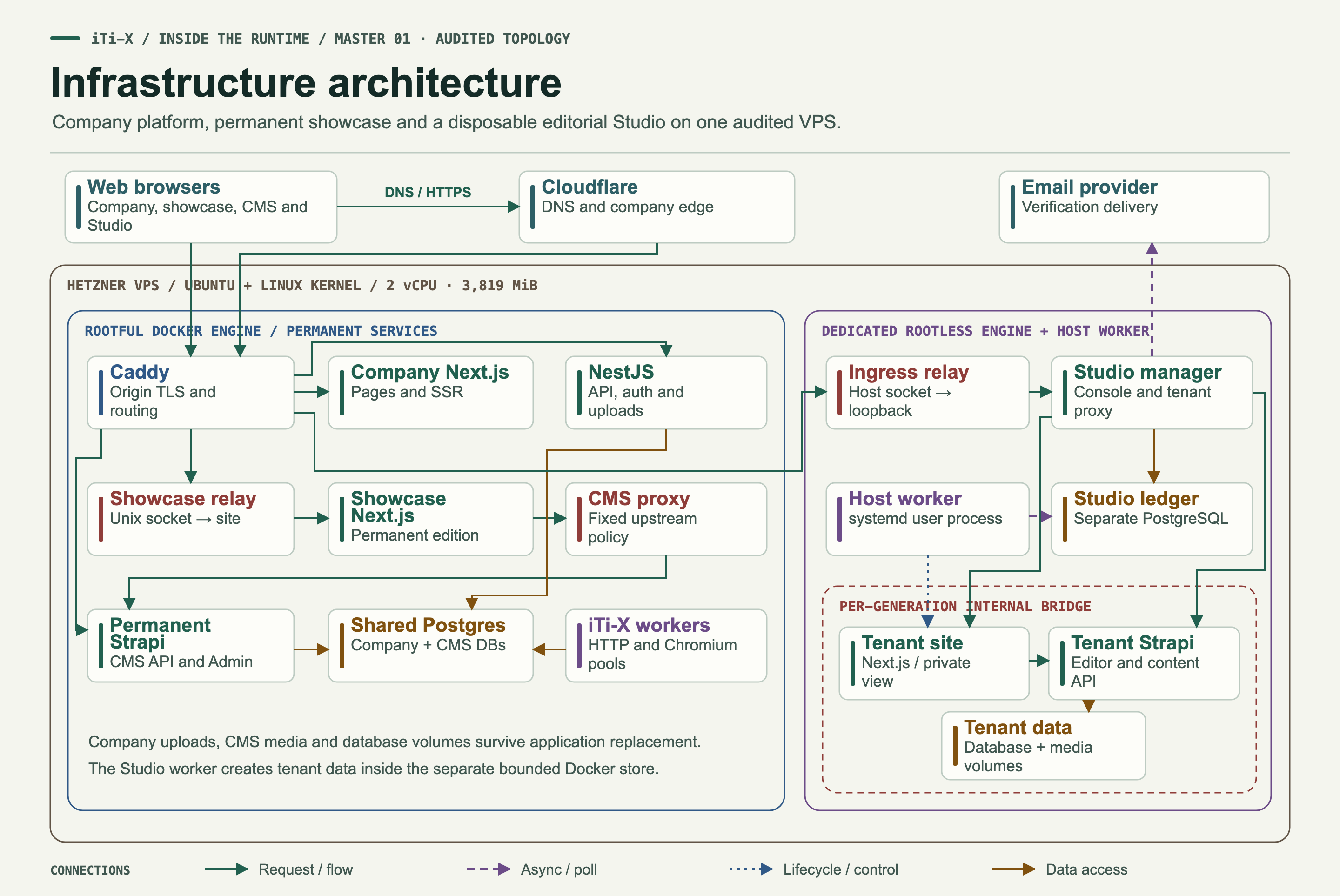
Our company site, permanent CMS and Blocktopia showcase use the rootful Docker fleet. Studio has its own user account and rootless Docker daemon. That separation gives the provisioning worker a narrower Docker control domain. Both domains rely on the same VM, kernel and backing disk. Caddy is the public ingress for both, so a shared edge or guest failure can still affect them together. Rootless Docker changes how the daemon and containers map privilege onto the host. Docker rootless mode
How source code becomes a running application
For Blocktopia, release work begins with reviewed Git revisions and locked dependencies. The build script runs Docker Buildx for a target architecture and labels the resulting images with their source revisions. The Next.js image installs dependencies, builds the application and copies its standalone server, static output and public files into a runtime stage. The tenant Strapi build compiles its admin interface and places the production runtime and demo seed in a smaller Node image. The manager and PostgreSQL have separate images. Docker multistage builds · Next.js standalone output
The Dockerfile describes build steps. The context determines which files those steps can access. Build cache can reuse a step when its inputs and dependencies match. The output image has filesystem layers and startup configuration. Content digests identify exact blobs and manifests. A tag is a convenient reference, and it can be moved. In this release workflow, verified archives carry built artifacts to the target daemons, where the release process checks image identity and architecture. A registry is another distribution option. OCI image specification · Docker build cache
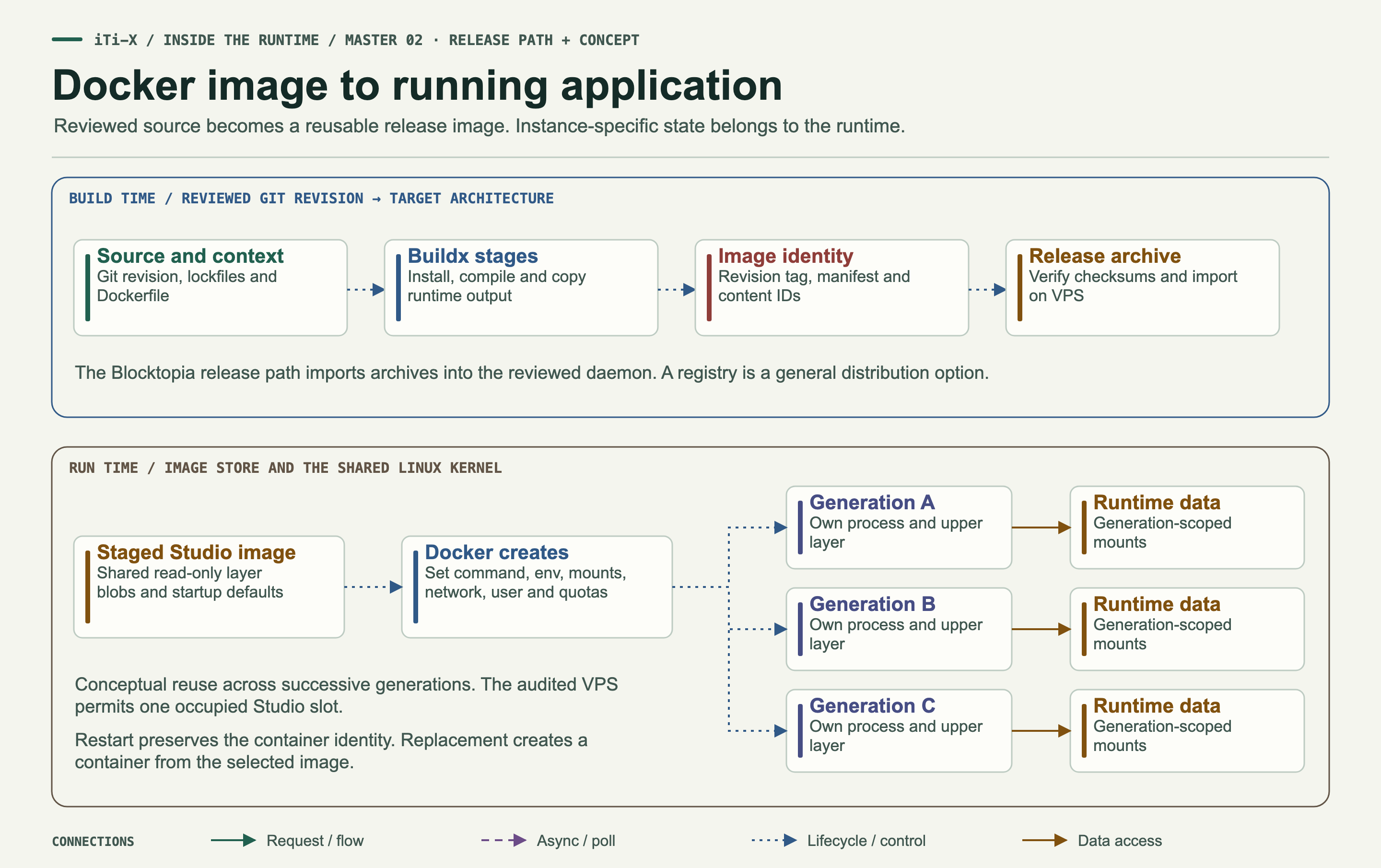
When the worker asks Docker to create a container, it selects a staged image and supplies settings such as the command, environment, network, volumes, runtime user and resource ceilings. Docker Engine delegates lifecycle operations through its runtime stack. The low-level OCI runtime prepares the process environment and starts the workload. The Linux kernel enforces the resulting isolation and resource policy. Multiple containers can use the same stored read-only layers. Each has its own runtime configuration and writable upper layer, subject to any read-only setting and mounts. OCI runtime specification · Docker storage drivers
Stopping a container leaves its configuration and writable layer available. Restarting it starts the same container from that configuration. Replacing it lets the operator select a new image and configuration, and the new container starts with a fresh upper layer. A named volume can be mounted again and outlive both containers. A tmpfs holds temporary state in memory. A bind mount exposes a selected host path, such as a reviewed configuration file. Those different lifetimes determine what a deployment can replace and what a recovery plan has to preserve. Docker storage mounts
Follow the browser request
DNS resolves the hostname. The iTi-X company domain goes through Cloudflare’s edge, and Caddy serves the origin. The public showcase, CMS and Studio names in the audit resolved to the VPS. Caddy terminates origin HTTPS and routes by hostname. For the company site, page requests go to a Next.js server, while API, authentication and approved upload routes go to NestJS. NestJS validates requests, executes business logic and queries PostgreSQL where needed. Next.js can prepare HTML and a React payload on the server before browser-side code takes over interactive controls. Exact rendering and caching behavior varies by route. Next.js Server and Client Components
The permanent Blocktopia site uses its own Next.js process. Caddy reaches it through a Unix socket relay. The renderer fetches content through a fixed-upstream CMS proxy on a dedicated bridge. The proxy can reach permanent Strapi on the application network and allows the intended read paths. Strapi uses a logical database in the same PostgreSQL server as iTi-X, plus its own uploads volume. That arrangement makes database roles, network attachments and backup scope important.
Compose can wait for the database to report healthy before starting the backend and for the backend before starting the frontend. A process health check answers whether a dependency is responding at that point. A user journey may need more. Studio waits for an entire content baseline to be readable before exposing the tenant.
Two jobs for background execution
The iTi-X application has dedicated HTTP and browser worker containers. The company API persists work to PostgreSQL. The appropriate pool claims it transactionally, handles it outside the initiating HTTP request and persists the result. Each worker process runs one job at a time. The browser pool can launch Chromium. Bounded recovery can requeue certain stale claims, and the job data carries progress and terminal state. Those mechanics let an API response acknowledge work before the result exists.
Studio calls its background process a worker as well. It runs as a systemd user service on the host. The manager is the HTTP gateway. It owns enrollment, browser state and request authorization. PostgreSQL holds the session queue and state. The host worker reconciles desired sessions with Docker resources. It checks capacity and health, creates generations and verifies deletion. The manager has no Docker socket, and the worker does not accept public HTTP. The ledger is the coordination point between the two processes.
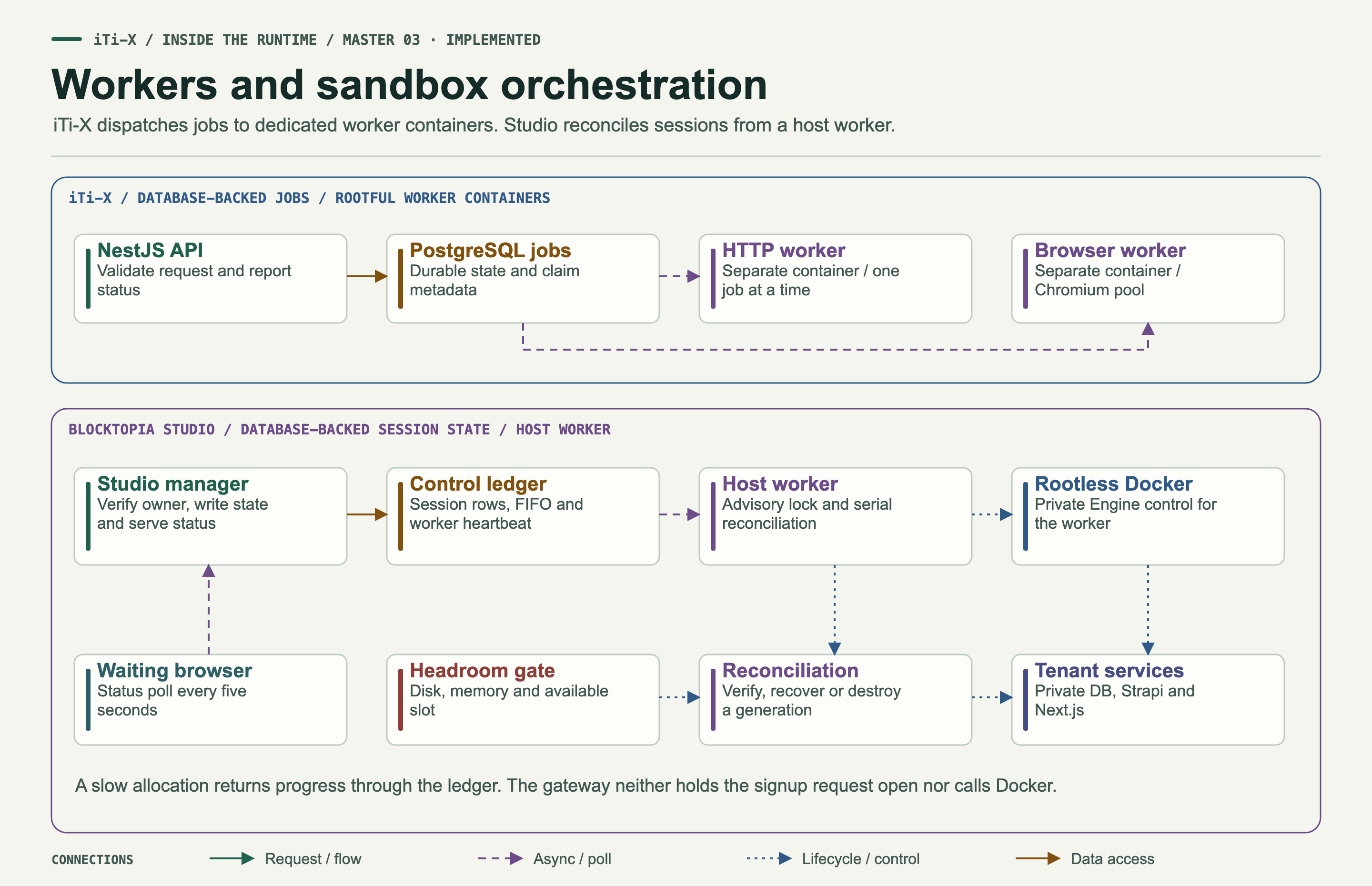
A queue stores work waiting to be handled. A scheduler decides when work is eligible. An orchestrator coordinates resources and lifecycle transitions. In Studio, polling and deadlines in the host worker cover scheduling, while PostgreSQL rows record which transition should happen. In the company workers, a durable job can finish with a result. Studio’s lifecycle finishes when the temporary resources are gone.
A Studio session, from email to cleanup
The entrance is a small public console, separate from the permanent showcase. The visitor requests a verification code. The manager checks the request origin, the address context supplied by ingress and rate limits. It stores a digest of the challenge and sends the code by authenticated mail. The browser gets a secure, host-scoped cookie. A valid code consumes the challenge and puts that browser’s verified request into the queue.
The deployed profile permits one occupied Studio slot and up to six verified waiting requests. The worker takes the oldest verified request when capacity and resources allow it. A database advisory lock limits reconciliation to one worker on the ledger, and the claim happens inside a transaction. The resource gate checks host disk space, pilot disk space and available RAM. The worker can remain responsive while the gate keeps requests waiting.
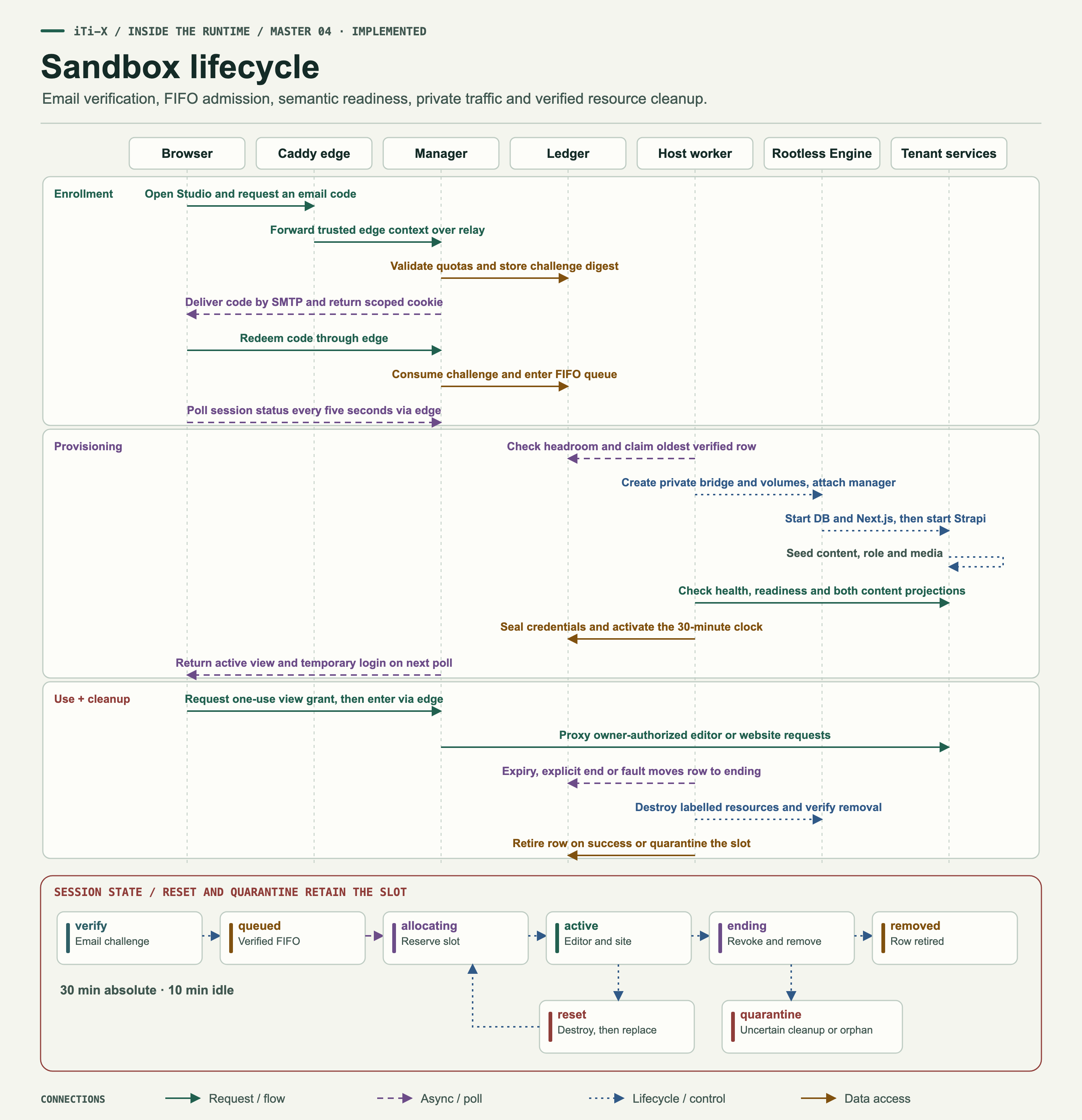
Once it claims a request, the worker gives it a generation ID, a private bridge and new database and media volumes. It connects the manager to the bridge and starts PostgreSQL and Next.js. It prepares the database role and starts Strapi. The tenant bootstrap seeds reviewed content and media, provisions a scoped editor role and creates generation-specific credentials. The visitor’s email is used for verification. Strapi presents a generated tenant login.
The worker checks Strapi health, renderer readiness and both content projections. It reads the expected contract version, four projects and three watch presets before marking the session active. The thirty-minute lifetime begins at activation. The browser polls for progress about every five seconds, so verification can return promptly while the worker prepares the runtime.
To open Strapi or the website, the owner exchanges a short-lived one-use grant for a host-scoped cookie on the selected tenant hostname. Caddy forwards tenant requests to the manager through a private gateway relay. The manager checks host, current generation, session ownership and permitted routes before proxying on the tenant bridge. Strapi independently requires the temporary editor login. The private published hostname exposes the published view.
The editor can save a draft and follow a signed preview link. Next.js uses the draft credential on the server and validates the returned content. Publishing updates Strapi and emits a signed callback to the tenant’s Next.js process, which invalidates its published cache. The browser can then read the changed edition on the private website. The interactive watch is rendered with Three.js in the visitor’s browser. The CMS stores the editorial settings that give the watch its initial presentation. Strapi Draft & Publish · Next.js Draft Mode
The session ends after thirty minutes, ten minutes of inactivity, an explicit end or an unrecoverable runtime failure. Console status polling leaves the idle clock alone. Saving supported editorial content or explicitly keeping the session active can extend the idle window within the absolute deadline. The manager rejects access once the session is no longer valid. The worker removes the generation’s containers, network and volumes, then checks that the resources are gone. Reset runs the same destruction before creating a fresh generation within the original deadline. A cleanup failure quarantines the slot so the next request cannot inherit an uncertain runtime.
Why isolation involves more than a container
A tenant runs reviewed application images with restricted editing permissions. The runtime adds a private bridge, generation-specific credentials, bounded request sizes, memory and CPU ceilings, and limited mounts. The tenant CMS and renderer run as non-root processes with read-only roots and narrow temporary write areas. Each tenant database stores its edits in a separate disposable volume. The tenant containers publish no host ports. The manager’s attachment to the generation network supports the authorized HTTP paths. The host worker’s dedicated rootless credentials support lifecycle operations.
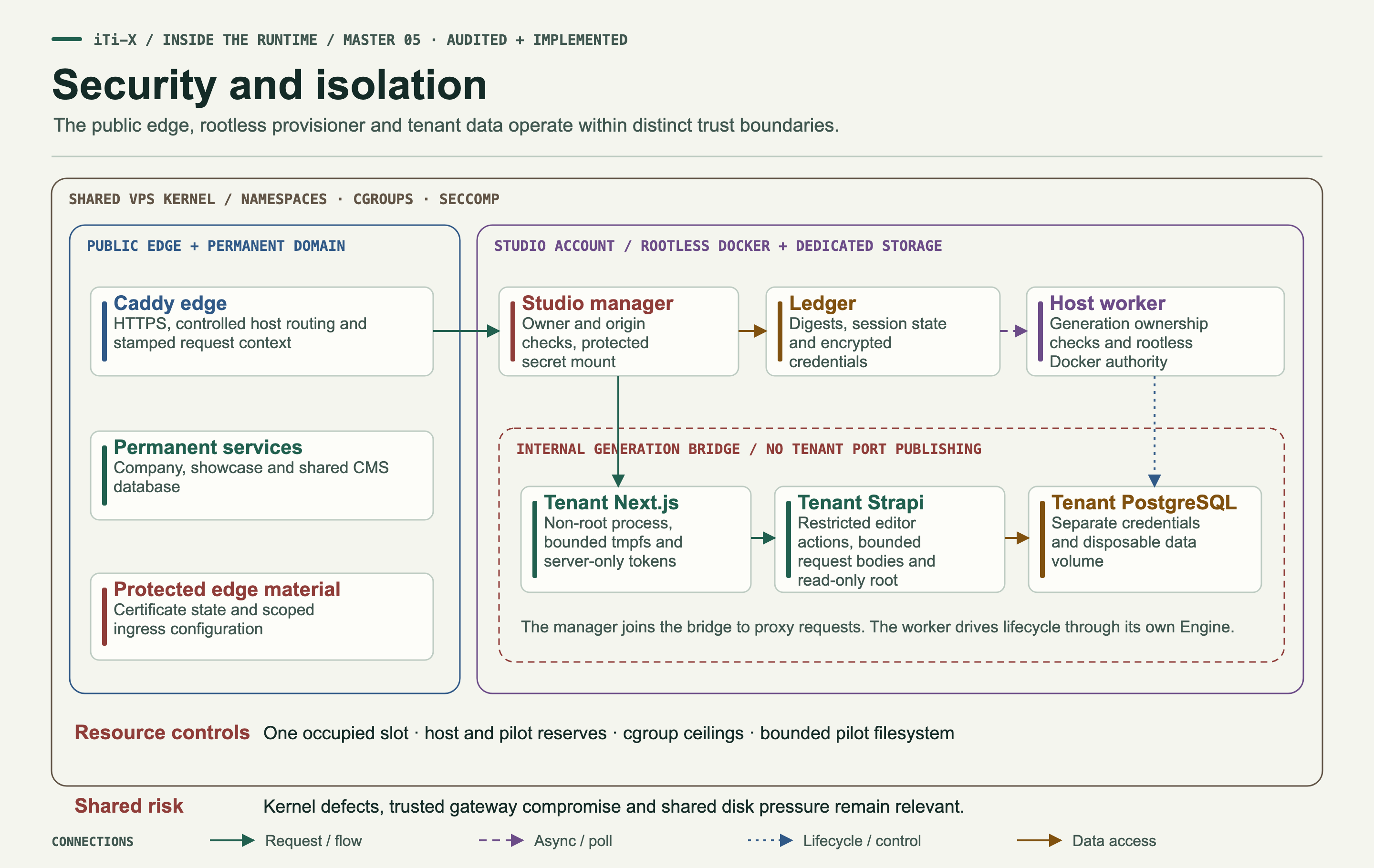
These controls have different responsibilities. A private bridge controls reachability. A database role controls data access. A host-scoped cookie controls what a browser can present to one hostname. A cgroup accounts for resources used by processes. Docker authority, gateway trust, shared kernel defects and disk pressure remain relevant. The Studio account has an aggregate limit and a bounded data filesystem. The admission gate checks free space both there and on the host because the two filesystems share a backing device.
Permanent data has a longer lifetime. Company records, CMS records, uploaded files and Caddy certificate state use persistent storage. The permanent CMS recovery procedure pairs its logical database with its media volume and rehearses restoration away from the live services. A Studio generation is intended to disappear completely. The control ledger can retain redacted operational events and aggregate counters according to its retention policy.